Stardew Better Signs
Stop accidentally overwriting your signs
A lightweight SMAPI mod that locks signs once they have content. Right-clicking a sign no longer replaces its displayed item or prompts to change the text. To update a sign, simply break and re-place it.
Download on Nexus ModsFeatures
Sign Content Protection
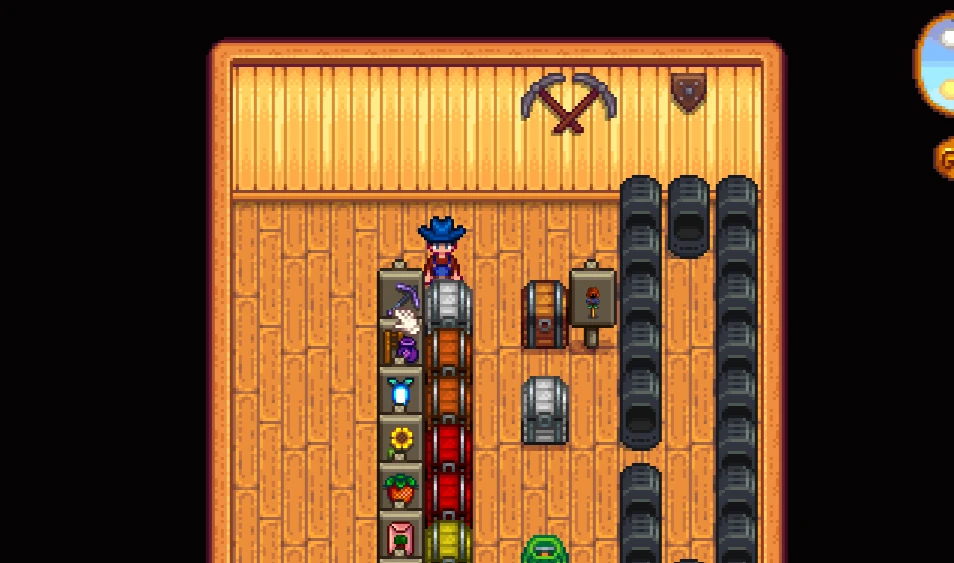
Any sign that already displays an item or text is locked. Right-clicking it will no longer overwrite or prompt to change the content.
Break to Edit
To change a sign, simply break it and place it back down. You can then set new content as normal — intentional changes are never blocked.
Zero Configuration
Install once and it just works. No settings, no menus, no configuration files — Better Signs is invisible until you need it.
See It in Action
Why Better Signs?
Simple & Focused
Unlike complex UI mods, Better Signs does one thing perfectly: protects your signs. No feature creep, no bloat.
Zero Learning Curve
Install and forget. No hotkeys to memorise, no menus to open, no config to write. It just works the moment SMAPI loads.
Performance Friendly
Minimal code with zero performance impact, even on farms with hundreds of signs spread across multiple locations.
Multiplayer Ready
Works flawlessly in co-op without sync issues. Every player's interactions respect locked sign content equally.
About Better Signs
In vanilla Stardew Valley, right-clicking any sign immediately prompts you to replace its displayed item or change its text — even if you only meant to read it. One misclick can wipe out a carefully placed label. Better Signs fixes this by locking sign content once it's set. The mod changes the right-click behaviour so existing signs are read-only until you deliberately break and re-place them. It's a small change with a big quality-of-life impact, especially for players who use signs heavily for farm organisation.
By the Numbers
How to Install
Better Signs requires SMAPI — the Stardew Valley Modding API.
Install SMAPI first, then download Better Signs from
Nexus Mods
and place the mod folder inside your Stardew Valley/Mods directory.
Launch the game through SMAPI and the mod activates immediately — no configuration needed.
Questions or Issues?
Frequently Asked Questions
What does Better Signs do?
It prevents you from accidentally overwriting a sign's displayed item or text. Right-clicking a sign with content no longer replaces it — break and re-place to edit.
Is Better Signs free?
Yes. Completely free to download via Nexus Mods. No ads or sign-up required beyond a standard Nexus Mods account.
Does this require SMAPI?
Yes. Install SMAPI from smapi.io first, then drop the Better Signs mod folder into your Stardew Valley Mods directory.
Which Stardew Valley version does this support?
Built for Stardew Valley 1.6 with SMAPI 4.1.10. It may work with newer versions — check the Nexus Mods page for the latest notes.
How do I change a sign with this mod installed?
Break the sign with your axe or pickaxe, then place it down again. You can then set new content as normal.
Will it conflict with other mods?
Better Signs is a lightweight, targeted mod with no known conflicts. Report any issues in the comments on Nexus Mods.
Right-clicking still changes my sign — what should I check?
Make sure you're launching Stardew Valley through SMAPI, not the vanilla launcher or Steam directly. Also confirm the Better Signs mod folder is inside your Stardew Valley/Mods directory.
Ready to Protect Your Farm?
Takes 2 minutes to install. Works immediately. 100% free.
Download on Nexus Mods →